1. Ramping#
Even with robust numerical solvers and thoughtfully chosen default tolerances, simulations may occasionally fail under certain conditions. This is often due to either inconsistent initial conditions or stiffness issues that prevent proper initialization from a rested state. While our solvers are designed to handle many scenarios effectively, the following issues may still arise:
Inconsistent initial conditions:
Many solvers are capable of detecting and resolving inconsistent initial conditions before taking the first step. However, this feature can be disabled, allowing bad initial conditions to be passed to the solver, and generally resulting in failures.
Stiff problems:
Some problems are inherently stiff and cannot be initialized effectively, even with a solver’s initialization correction schemes. In such cases, the solver may have difficulty determining a stable solution.
To address these issues, introducing a ramped load can stabilize the simulation. By default, thevenin models are set to always ask the solver to correct the initial condition. The starting guess that gets passed to the solver is typically a rested condition. Therefore, ramped loads can gradually adjust from the initial state to the desired load, making them easier for the solver to handle. This technique helps avoid the solver crashing due to an abrupt change in load.
In this tutorial, we will demonstrate how to use the loadfns module to create a ramped load profile. While we will focus one specific function, other useful helper functions are available in the loadfns module, and we encourage you to explore the full documentation for more information.
1.1. Creating Ramped Demands#
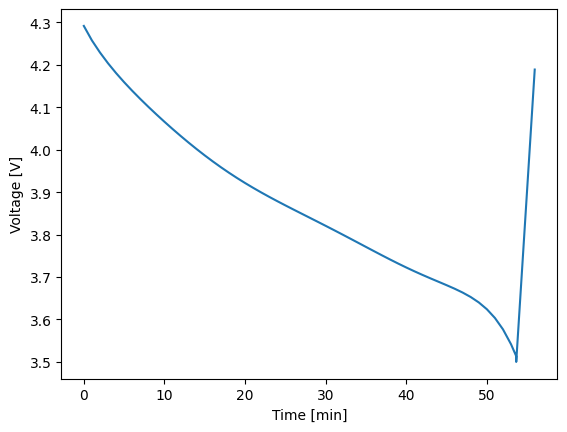
thevenin models support both constant and dynamic load profiles for each experimental step. For example, below we make a profile that discharges the battery at a constant current until 3.5 V and then charges the battery by ramping the voltage at a rate of 0.005 V/s until 4.2 V is reached.
1import thevenin as thev
2import matplotlib.pyplot as plt
3
4def voltage_ramp(t: float) -> float:
5    return 3.5 + 5e-3*t
6
7expr = thev.Experiment()
8expr.add_step('current_A', 75., (3600., 60.), limits=('voltage_V', 3.5))
9expr.add_step('voltage_V', voltage_ramp, (600., 10.), limits=('voltage_V', 4.2))
Using Callable inputs for dynamic profiles provides a high-degree of flexibility. Users can write any constant or dynamic load, including interpolations of data. However, we also provide functions for select loads in the loadfns module that can help with solver stability and to reduce the amount of code users need to write for simple profiles. For instance, the same experiment above can be constructed using the Ramp class, as shown below.
1voltage_ramp = thev.loadfns.Ramp(5e-3, 3.5)
2
3expr = thev.Experiment()
4expr.add_step('current_A', 75., (3600., 60.), limits=('voltage_V', 3.5))
5expr.add_step('voltage_V', voltage_ramp, (600., 10.), limits=('voltage_V', 4.2))
The code below we demonstrate runs the protocol defined above, demonstrating that the model and experiment perform as expected.
1sim = thev.Simulation()
2
3soln = sim.run(expr)
4soln.plot('time_min', 'voltage_V')
[thevenin UserWarning] Using the default parameter file 'params.yaml'.
1.2. Stability Ramps#
Ramps can also be used to quickly move from a rested state to a constant load. This can help with solver stability by avoiding instantaneous jumps from a rested state to a non-rested state. To build this type of provile, use the Ramp2Constant class. Below, we ramp to a 20C discharge in one millisecond and then hold the 20C discharge rate until 3 V is reached.
1dynamic_load = thev.loadfns.Ramp2Constant(20*75/1e-3, 20*75)
2
3expr = thev.Experiment()
4expr.add_step('current_A', dynamic_load, (180., 0.5), limits=('voltage_V', 3.))
5
6soln = sim.run(expr)
7soln.plot('time_s', 'current_A')
8soln.plot('time_s', 'voltage_V')
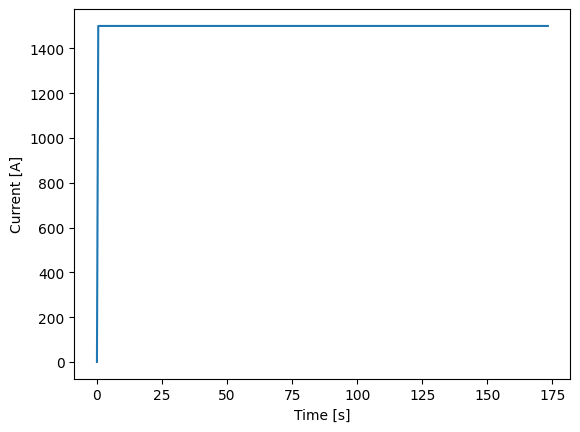
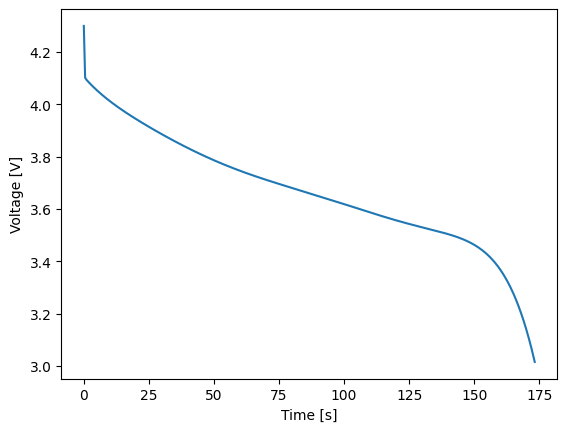
This type of “stability” ramps becomes more and more helpful (or needed) as loads become more demanding. Their need can also depend on the model’s parameter set, i.e., a model may crash for one set of parameters when an instantaneous 5C discharge is demanded whereas another parameter set may be stable up to a 20C.
1.3. Comparing to Instantaneous Demands#
The default model parameters, and equivalent circuit models in general, are fairly stable compared to higher-fidelity models (e.g., the single particle model or pseudo-2D model). Therefore, here we can also demonstrate that when we run an instantaneous 20C discharge profile that the results are not significantly impacted. See the figure below that compares the voltage profile above to one obtained without the ramped profile.
 1expr = thev.Experiment()
 2expr.add_step('current_A', 75*20, (180., 50), limits=('voltage_V', 3.))
 3
 4soln2 = sim.run(expr)
 5
 6plt.plot(soln.vars['time_s'], soln.vars['voltage_V'], '-k')
 7plt.plot(soln2.vars['time_s'], soln2.vars['voltage_V'], 'ok', markerfacecolor='none')
 8
 9plt.xlabel('Time [s]');
10plt.ylabel('Voltage [V]');
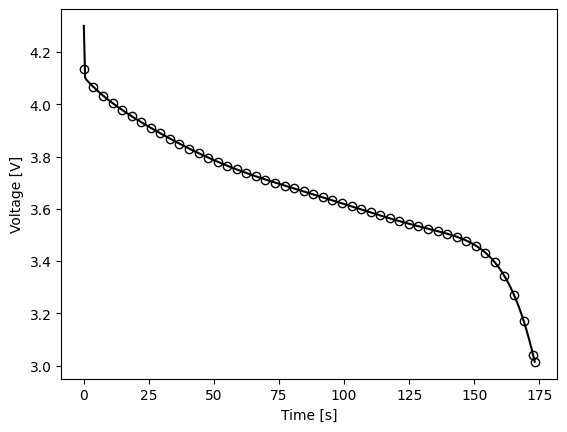
Due to the ramp, the initial conditions are obviously a bit different. However, since the ramp occurs over just one millisecond, the profile from the ramped case (solid line) very quickly adjusts to the same voltage as the case where current is instantaneous (open markers). The solutions maintain good agreement throughout the rest of discharge.
1.4. Conclusion#
In this tutorial, you’ve seen how ramped loads can stabilize simulations that struggle with abrupt load changes. By using the loadfns module, you can easily implement these profiles, ensuring smoother transitions for the solver. For more advanced load functions, check out the full documentation.